

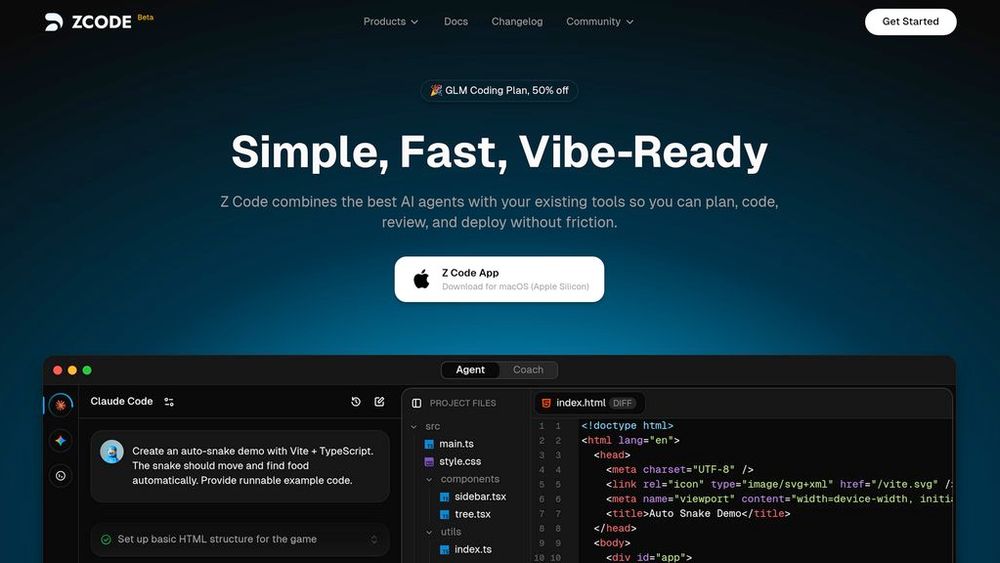
What is Z Code?
Z Code is a desktop code editor developed by Zhipu AI that consolidates access to leading AI coding assistants including Claude Code, Codex, and Gemini within a single interface. The platform enables developers to execute coding, debugging, and analysis tasks through conversational prompts while maintaining precise control over AI actions. Built around human-AI collaboration, Z Code provides visual workflow management and granular permission controls, allowing developers to leverage various AI models without switching between multiple tools or managing separate subscriptions.
Key Features Multi-Agent Integration
Seamlessly switch between top AI coding tools like Claude Code, Codex, and Gemini within one unified interface, enabling flexible model selection for different development tasks.
Thinking Mode
Advanced reasoning capability where the AI agent self-analyzes and refines its logic before executing responses, ensuring more accurate and thoughtful code suggestions.
History Reconstruction
Modify and re-execute any previous conversation step to fine-tune agent behavior, providing full control over the development workflow and iterative improvements.
Permission-Based Controls
Granular security system requiring explicit user approval before the agent performs sensitive operations such as file modifications or command-line execution.
Natural Language Coding
Drive development tasks through conversational prompts, enabling developers to communicate intent naturally and receive context-aware code generation and refactoring.
Use Cases Rapid Prototyping : Developers can quickly generate code scaffolding and initial implementations through natural language descriptions, accelerating project kickoff phases. Code Debugging : Engineers leverage multiple AI models to analyze bugs, identify root causes, and receive fix suggestions with explanations for complex issues. Code Refactoring : Teams modernize legacy code by instructing AI agents to restructure and optimize existing implementations while maintaining functionality. Learning and Onboarding : Junior developers accelerate skill development by receiving explanations and guidance from AI assistants while working on real projects. Cross-Model Experimentation : Developers compare outputs from different AI models for the same task, selecting the most suitable solution for specific coding challenges. FAQs
- What AI models does Z Code support?
- How does the permission control system work?
- What is Thinking Mode?
- Can I modify previous AI interactions?
- Is Z Code suitable for beginners?
- How is Z Code different from using Claude or ChatGPT directly?
- What programming languages does Z Code support?