
What is Polyglotta?
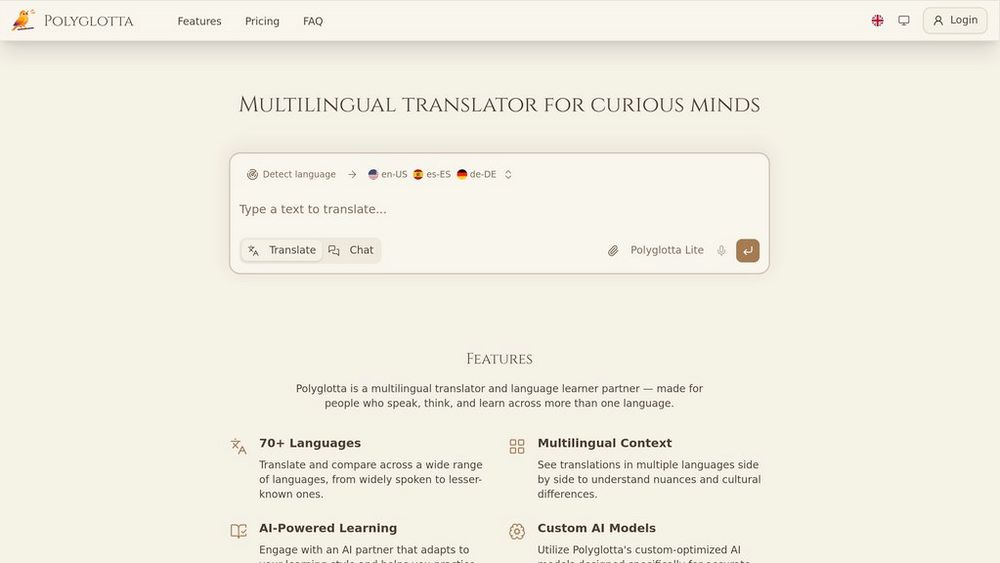
Polyglotta is a comprehensive multilingual translation platform designed for language learners, polyglots, and linguistic professionals who work across multiple languages simultaneously. The platform provides clean, parallel translations of words and phrases across 70+ languages, allowing users to directly compare how meaning, expression, and cultural context shift between different linguistic systems. Unlike traditional single-pair translators, Polyglotta emphasizes simultaneous comparison and active learning, combining three core elements: side-by-side translation results, an interactive AI chat partner for conversational practice, and high-quality audio pronunciation guides. The platform leverages custom-optimized AI models with automatic language detection to ensure contextually relevant translations, and includes a community feedback system where users can contribute to continuous improvement of translation quality. Available as a web application with an iOS app in development, Polyglotta offers both free access and flexible subscription tiers to accommodate varying usage needs.
Key Features Side-by-Side Multilingual Translation
Input a word or phrase in any language and receive translations displayed parallel to each other across 70+ languages, enabling direct comparison of linguistic differences and cultural nuances without switching between tabs.
Interactive Chat Learning Mode
Engage with an conversational AI partner for language practice and learning, allowing users to explore grammar patterns, idiomatic expressions, and contextual usage through interactive dialogue.
AI-Generated Audio Pronunciation
High-quality pronunciation audio in multiple voices supports correct language learning and speaking skill development, with functionality accessible via speaker icons next to translation results.
Customizable Language Configuration
Users can configure up to 5 languages as source, target, or auxiliary languages based on personal learning goals, with settings preserved for streamlined workflow across sessions.
Community-Driven Translation Improvement
Participate in a collaborative ecosystem where users vote on translations, submit feedback, and engage with translation threads to collectively enhance translation accuracy and cultural appropriateness.
Real-Time Translation Refinement
Refresh feature allows users to regenerate translation results multiple times, helping reduce AI translation errors and improving output quality for demanding professional or academic work.
Use Cases Language Learning and Education : Students and self-directed learners use Polyglotta to acquire new vocabulary, understand grammatical structures across languages, and practice pronunciation—accelerating language proficiency through comparative learning methods. Multilingual Research and Academia : Researchers and scholars working with multilingual sources consult Polyglotta to verify translations, compare how concepts are expressed across languages, and ensure accuracy in academic work spanning multiple linguistic contexts. Professional Translation and Localization : Professional translators and localization specialists use Polyglotta to verify terminology accuracy, explore cultural differences in expression, and improve translation quality through community feedback and iterative refinement. Intercultural Business Communication : International business professionals leverage Polyglotta to communicate effectively across language barriers, understand nuanced meanings in multilingual documents, and adapt messaging for diverse cultural audiences. Travel and Cultural Exploration : Travelers and cultural enthusiasts prepare for international trips by learning common phrases, understanding pronunciation, and gaining insight into how different cultures express similar concepts. FAQs
- How many languages does Polyglotta support?
- What's the difference between Translate and Chat modes?
- How does the pronunciation audio feature work?
- What should I do if a translation seems inaccurate?
- Can I use Polyglotta on my mobile device?
- How does the community feedback system work?
- Is there a free version of Polyglotta?
- What internet speed do I need to use Polyglotta?