
What is Flora?
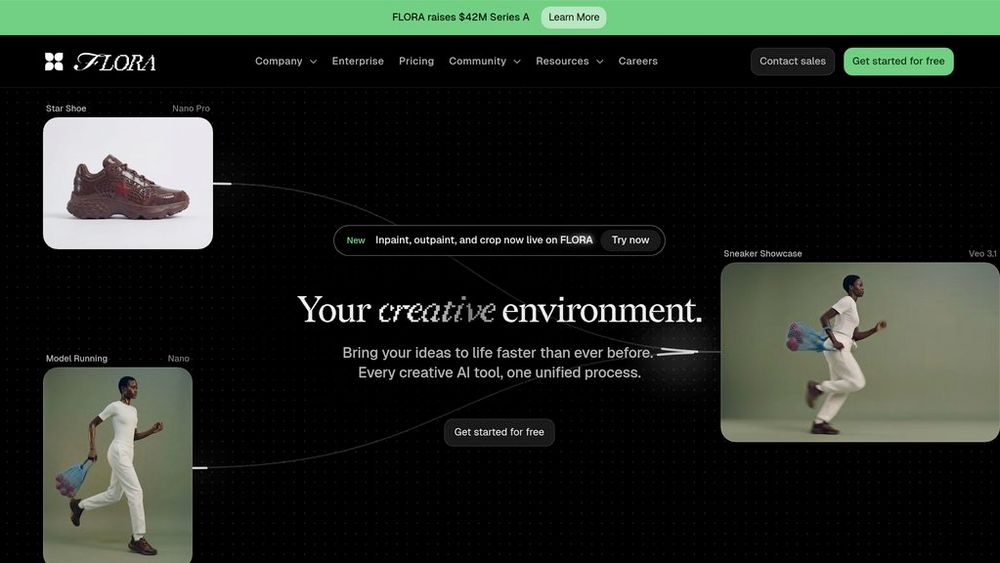
Flora is a generative workflow platform designed for professional creative teams. It consolidates leading text, image, and video models from major AI providers into one unified canvas, eliminating the need to switch between multiple subscriptions and platforms. The platform features an innovative node-based interface that allows creatives to build structured, scalable workflows—connecting prompts, models, and refinements into visual pipelines that can be easily iterated, reused, and handed off across teams. With support for 50+ models including Veo 3, Kling, FLUX, Gemini, and others, Flora enables teams to experiment with multiple models in parallel, maintain brand consistency, and compress weeks of creative iteration into hours.
Key Features Node-Based Workflow System
Visual workflow builder that displays every step of the creative process. Connect text prompts, image nodes, video generators, and refinement tools into repeatable pipelines that scale across projects and team members without requiring technical expertise.
Multi-Model Canvas with 50+ Generators
Access an extensive library of generative models spanning text, image, and video from providers like Google Gemini, OpenAI GPT-5, FLUX, Kling, Veo, Seedream, and many others—all available through a single subscription without managing separate licenses.
Real-Time Team Collaboration
Workspaces support simultaneous multi-user editing with shared assets, contextual feedback, version history, and cross-workspace project sharing. Invite collaborators with flexible permissions and credit-based access, eliminating seat limitations.
Parallel Model Orchestration
Run multiple generative models simultaneously on the same prompt to test styles, compositions, and outputs side-by-side. Compare results instantly and identify the strongest creative directions without sequential render cycles.
Commercial-Grade Output
Generate production-ready assets with clear commercial usage rights and workspace-level model governance. Integrated upscaling, style refinement, and enhancement tools prepare final outputs for immediate deployment.
Intelligent Workflow Templates
Save successful workflows as reusable templates for consistent, on-brand asset production. Auto Mode recommends optimal models by content type, reducing decision fatigue while maintaining creative control.
Use Cases Fashion & E-Commerce : Generate product photography, garment try-ons, model styling variations, and campaign imagery from single reference images. Maintain consistency across collections and accelerate seasonal campaign production with minimal reshoots. Brand & Marketing Campaigns : Create mockups, previz materials, icon systems, and marketing assets at scale. Build templated workflows to generate consistent, on-brand deliverables across multiple campaigns while maintaining visual coherence. Film & Visual Effects : Develop character and environment variations, test lighting conditions, and create previz sequences for scenes. Use story analysis to generate consistent shots from scripts, supporting pre-production planning and concept exploration. Photography & Concepting : Rapidly explore materials, lighting, composition, and aesthetic directions from sketches or concepts. Generate multiple stylistic variations and campaign mockups before committing to expensive production resources. Architecture & Design Visualization : Produce instant architectural renders, lighting studies, material mockups, and spatial concepts. Iterate on design proposals with instant visual feedback and test multiple aesthetic directions efficiently. FAQs
- What is Flora and how does it differ from other AI tools?
- How much does Flora cost?
- Can my team collaborate in real-time on Flora?
- Which AI models does Flora include?
- Can I use Flora outputs commercially?
- What is a node-based workflow and why does it matter?
- Is there a learning curve to using Flora?
- Can I run multiple models at the same time in Flora?