
What is DataFast?
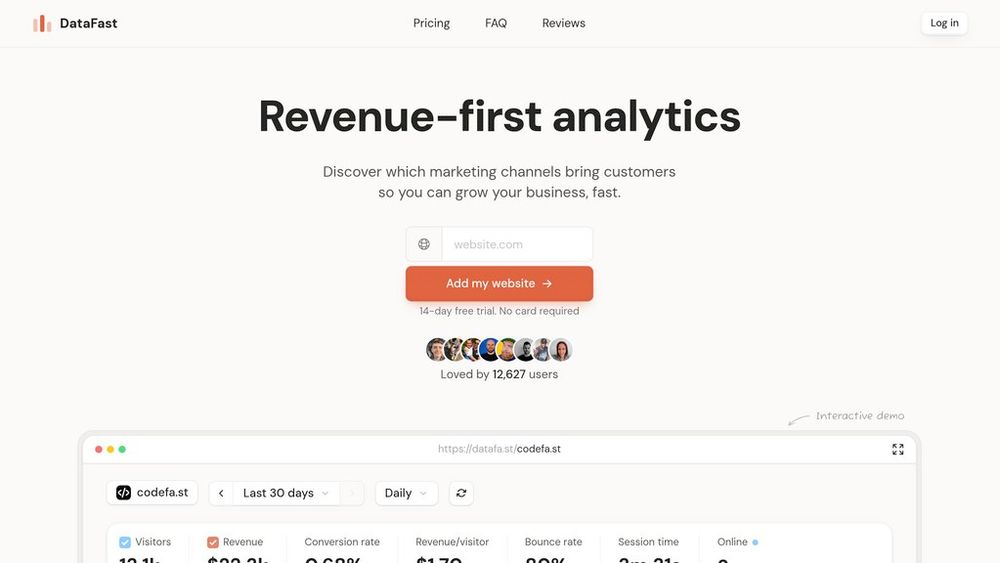
DataFast is a revenue-first analytics platform built for founders and marketing teams who want to stop guessing and start investing in the channels that truly drive customers. Instead of focusing on vanity metrics like pageviews or bounce rate, DataFast connects website traffic with real revenue by combining event tracking, URL parameters, and payment provider integrations. With a clear, focused dashboard and streamlined setup, it becomes the single source of truth for understanding which campaigns, referrers, and content are responsible for new customers and recurring revenue.
Key Features Revenue Attribution by Channel
Connect payment providers and automatically tie revenue back to campaigns, referrers, and URLs so you can see which channels create paying customers instead of just clicks.
Clean, Actionable Funnel Analytics
Track custom goals and conversion funnels from first visit to payment, making it easy to spot drop-off points and fix leaks in your acquisition and onboarding flows.
Simple UTM and Referrer Tracking
Automatically capture UTM parameters and common query tags like ref, source, and via, giving you clear insight into which campaigns, partnerships, and content pieces actually convert.
Native Payment and Platform Integrations
Install a lightweight script, connect providers like Stripe, LemonSqueezy, Paddle, Shopify, and more, and sync key events without building a custom data pipeline.
Privacy-Friendly, Founder-Focused Design
A focused interface built for entrepreneurs: essential metrics, fast dashboards, and documentation that prioritizes clarity over complexity, without bloated enterprise features.
APIs and Developer-Friendly Setup
Comprehensive docs, API endpoints, and installation guides for popular stacks and frameworks let developers integrate DataFast quickly into modern SaaS and product sites.
Use Cases Founders Optimizing Marketing Spend : Startup founders use DataFast to see exactly which channels and campaigns generate high-value customers, then reallocate budget away from noise and into profitable sources. SaaS Teams Tracking MRR by Source : SaaS companies connect their billing platform to track subscriptions and upgrades by acquisition channel, revealing which sources drive the best long-term revenue. Creators and Indie Hackers Validating Growth Experiments : Solo builders run experiments across X, newsletters, communities, and affiliates, then rely on DataFast to show which efforts actually convert followers into paying users. E-commerce and Info Product Funnels : Online stores and course creators map traffic from ads, affiliates, and content to checkout and purchases, quickly identifying winning funnels and underperforming campaigns. Agencies Reporting Revenue-Backed Results : Marketing agencies integrate client payment data to prove which campaigns drive real sales, improving retention with clear, revenue-based reporting instead of vanity dashboards. Product Teams Improving Onboarding : Product managers track key activation and payment events in a simple funnel, helping them prioritize fixes and features that directly increase conversion to paid. FAQs
- What is DataFast?
- Who is DataFast best suited for?
- How does DataFast track revenue?
- Can I use DataFast alongside other analytics tools?
- Does DataFast require a complex setup?
- What kind of events and goals can I track?
- Is there a mobile app available?
- How is DataFast different from traditional analytics tools?